Quick start: inspect a real transform on synthetic inputs
This exercise uses the installed CLI and production bathymetry pipeline. Its tiny source raster and H3 support are synthetic, so a passing run demonstrates software behavior rather than regional accuracy.
After installation, choose a fresh workspace outside the source checkout:
cd "$(mktemp -d "${TMPDIR:-/tmp}/seascape-first-result.XXXXXX")"
export SEASCAPE_WORKSPACE="$PWD/seascape-workspace"
seascape --workspace "$SEASCAPE_WORKSPACE" demo
The CLI reports Synthetic software acceptance: PASS (not a regional release) only after its checks and figures succeed. It prints exact paths beneath $SEASCAPE_WORKSPACE/.seascape/demo/ to:
| Output | Why inspect it |
|---|---|
output/BATHYMETRY.parquet |
Positive-down depth statistics on exact H3 R8 support |
output/bathymetry_manifest.json |
Synthetic source identity and artifact checksums |
report.json |
Executed controls and PASS/FAIL evidence |
figures/input.png, figures/output.png |
Source and output visual checks |
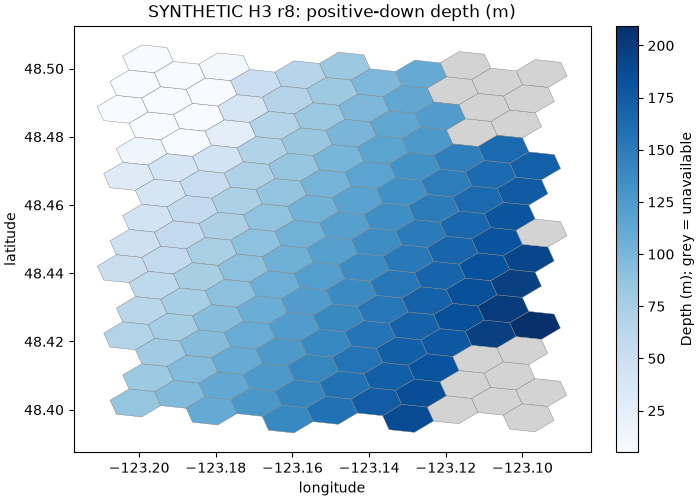
The fixture includes constant depth, gradient, sea-level, and nodata controls. Missing depth remains null; observed flat variation can legitimately be zero. Read the full demo guide for exact expected values, safe reruns, and validation limits.
Next steps
- Read seascape concepts to distinguish cells, source evidence, and products.
- Use the variable catalog to find fields and source limitations.
- For real inputs, follow bounded real-data processing. Initializing a workspace and passing preflight do not by themselves create or validate a regional product.
- For an existing audited schema-3 release, use the public product API to freeze an exact release ID and resolution.